
A technical comparison between TCP and UDP protocols implemented in Python: examining performance metrics, security considerations, and practical applications within healthcare systems using FHIR standards for effective data exchange between medical platforms.
Introduction: The Significance of TCP vs UDP
When browsing websites, streaming videos, or making video calls, our data travels across networks using protocols that ensure reliable and efficient delivery. Two transport protocols dominate this landscape: TCP (Transmission Control Protocol) and UDP (User Datagram Protocol).
What fundamental differences exist between these protocols, and how do these differences impact performance in real-world applications?
Table of Contents
In this post, we’ll cover:
- The theoretical foundations of TCP and UDP
- Their practical differences demonstrated with Python
- A hands-on TCP and UDP communication benchmark
- Visual analysis of transmission times
- An asynchronous implementation using asyncio and aiohttp
- Secure Data Transmission in Healthcare IT
- Python for Medical Data Transfer
All the code for this project is available on GitHub
TCP vs UDP: Core Concepts Compared
TCP (Transmission Control Protocol)
- Connection-oriented: establishes a reliable connection with a three-way handshake, ensuring both parties are ready to communicate before any data transfer begins.
- Reliable: guarantees delivery and reorders packets if needed, with mechanisms for acknowledging received data and retransmitting lost packets automatically.
- Flow and congestion control: adapts to network conditions by monitoring bandwidth availability and adjusting transmission rates to prevent network congestion and packet loss.
- Used for: HTTPS, email, file transfers, SSH, web browsing, database connections, and any application where data integrity is critical.
UDP (User Datagram Protocol)
- Connectionless: sends data without setting up a connection, eliminating the overhead associated with connection establishment and termination processes.
- Unreliable: no guarantees for delivery or ordering, which means packets may arrive out of sequence, be duplicated, or not arrive at all without automatic notification.
- Minimal overhead: faster and lighter due to the absence of connection management, acknowledgments, and retransmission mechanisms found in TCP.
- Used for: DNS, video/audio streaming, online gaming, VoIP, live broadcasts, IoT devices, and time-sensitive applications where speed is prioritized over perfect reliability.
| Feature | TCP | UDP |
|---|---|---|
| Connection | Yes (Handshake) | No |
| Reliability | Yes | No |
| Ordering | Guaranteed | Not guaranteed |
| Speed | Slower | Faster |
| Use case | File transfer, web | Streaming, real-time gaming |
Understanding the socket Module in Python
Python’s socket module provides a low-level networking interface based on the BSD socket API. It supports both TCP (SOCK_STREAM) and UDP (SOCK_DGRAM) protocols, enabling developers to send and receive data across networks.
Key Functions and Concepts
socket.socket(family, type): creates a new socket object for network communication. For our networking purposes, we typically useAF_INET(for IPv4 addressing) and eitherSOCK_STREAMfor TCP connections orSOCK_DGRAMfor UDP datagrams, depending on our reliability and performance requirements.bind((host, port)): assigns a specific network address (combination of IP address and port number) to the socket, effectively reserving that address for the application. This function is primarily used on the server side to establish a known endpoint where clients can connect.listen(): configures a TCP socket to passively wait for and queue incoming connection requests, transforming it into a listening socket. This method is exclusive to TCP sockets since UDP doesn’t maintain connection state.accept(): blocks execution and waits for an incoming TCP connection request. When a client connects, it returns a new socket object specifically for that client connection along with the client’s address information.connect((host, port)): actively initiates a TCP connection from a client socket to a server at the specified address. This triggers the three-way handshake process that establishes a reliable TCP connection.sendall(data)/sendto(data, addr): transmits the specified data to the connected peer.sendall()is used with TCP connections and ensures all data is sent, whilesendto()is used with UDP and requires specifying the destination address with each call.recv(bufsize)/recvfrom(bufsize): receives incoming data from the peer, withbufsizeindicating the maximum amount of data to be received at once.recv()works with established TCP connections, whilerecvfrom()is used with UDP and additionally returns the sender’s address.close(): terminates the socket connection and releases the resources associated with it. For TCP sockets, this initiates the connection termination process, while for UDP sockets, it simply frees the socket descriptor.
The socket module operates in a blocking mode by default, which means function calls like recv() or accept() will pause execution until they complete their operation. In our benchmark, we implement threading to enable the server to listen for incoming data without halting the client’s execution flow.
Benchmarking TCP and UDP in Python
Goal
We’ll benchmark the transmission times for 100 simple messages sent between client and server over both TCP and UDP protocols in a local environment.
Setup
- Server and client implementations for each protocol
- Localhost communication (127.0.0.1)
threadingfor concurrent server operationtime.time()for precise timing measurementsmatplotlibfor visualizing performance results
#--------------------
# tcp vs udp
# di Michele Danilo Pierri
# 08/08/2025
#--------------------


"""
What this measures:
  - UDP: one datagram (request) -> echo (response) per transaction.
  - TCP: connect -> send -> recv -> close per transaction.
"""

import argparse
import socket
import threading
import time
from time import perf_counter
import statistics as stats
import matplotlib.pyplot as plt

# ---------------------------
# Defaults (tuneable via CLI)
# ---------------------------
DEFAULT_HOST = "127.0.0.1"
TCP_PORT = 57211
UDP_PORT = 57212

# Small payload accentuates handshake cost for TCP
DEFAULT_PAYLOAD = 32       # bytes
REPEAT = 400               # transactions per protocol
PACE = 0.001               # seconds between transactions to avoid bursts
TIMEOUT = 2.0              # seconds socket timeout

# ---------------------------
# Servers
# ---------------------------

def tcp_transaction_server(host: str, port: int):
    """
    Accepts connections in a loop.
    For each connection:
      - read exactly one payload (client sends once)
      - echo it back
      - close
    No artificial sleep; this stays 'real'.
    """
    with socket.socket(socket.AF_INET, socket.SOCK_STREAM) as s:
        s.setsockopt(socket.SOL_SOCKET, socket.SO_REUSEADDR, 1)
        s.bind((host, port))
        s.listen(128)
        while True:
            conn, _ = s.accept()
            try:
                with conn:
                    # Read exactly one message; size unknown to server,
                    # so read once up to some reasonable amount
                    data = conn.recv(65536)
                    if data:
                        conn.sendall(data)
            except ConnectionError:
                continue


def udp_echo_server(host: str, port: int):
    """
    Stateless echo: for each datagram, send it back to sender.
    """
    with socket.socket(socket.AF_INET, socket.SOCK_DGRAM) as s:
        s.setsockopt(socket.SOL_SOCKET, socket.SO_REUSEADDR, 1)
        s.bind((host, port))
        while True:
            data, addr = s.recvfrom(65536)
            if data:
                s.sendto(data, addr)

# ---------------------------
# Clients / Measurements
# ---------------------------

def measure_udp_transactions(host: str, port: int, payload: bytes, n: int):
    """
    For each transaction:
      - send one datagram
      - wait for echo
      - record transaction time (application-level RTT)
    """
    durations = []
    with socket.socket(socket.AF_INET, socket.SOCK_DGRAM) as c:
        c.settimeout(TIMEOUT)
        for _ in range(n):
            t0 = perf_counter()
            c.sendto(payload, (host, port))
            data, _ = c.recvfrom(65536)
            dt = perf_counter() - t0
            durations.append(dt)
            time.sleep(PACE)
    return durations


def measure_tcp_transactions(host: str, port: int, payload: bytes, n: int):
    """
    For each transaction:
      - connect()
      - send payload once
      - recv echo once
      - close
      - record full transaction time (includes handshake)
    """
    durations = []
    for _ in range(n):
        t0 = perf_counter()
        with socket.socket(socket.AF_INET, socket.SOCK_STREAM) as c:
            c.settimeout(TIMEOUT)
            # Optionally disable Nagle to avoid tiny writes coalescing
            c.setsockopt(socket.IPPROTO_TCP, socket.TCP_NODELAY, 1)
            c.connect((host, port))
            c.sendall(payload)
            # Expect a single echo; read once is typically enough on localhost/LAN
            data = c.recv(65536)
            # Close via context manager
        dt = perf_counter() - t0
        durations.append(dt)
        time.sleep(PACE)
    return durations

# ---------------------------
# Plot helpers
# ---------------------------

def summarize(name, arr):
    mean = stats.mean(arr)
    med = stats.median(arr)
    stdev = stats.pstdev(arr)
    return f"{name}: mean={mean:.6e}s, median={med:.6e}s, std={stdev:.6e}s, n={len(arr)}"

def plot_results(tcp, udp, payload_size):
    # 1) Boxplot for robust comparison
    plt.figure(figsize=(9,5))
    plt.boxplot([tcp, udp], labels=["TCP per-tx (handshake)", "UDP per-tx"])
    plt.title(f"Per-Transaction RTT (echo), payload={payload_size} bytes")
    plt.ylabel("Seconds")
    plt.tight_layout()

    # 2) Bar plot mean ± std
    plt.figure(figsize=(9,5))
    means = [stats.mean(tcp), stats.mean(udp)]
    stds  = [stats.pstdev(tcp), stats.pstdev(udp)]
    plt.bar(["TCP per-tx", "UDP per-tx"], means, yerr=stds)
    plt.title("Per-Transaction Mean ± Std")
    plt.ylabel("Seconds")
    plt.tight_layout()
    plt.show()

# ---------------------------
# Main
# ---------------------------

def main():
    ap = argparse.ArgumentParser(description="Real UDP vs TCP per-transaction benchmark")
    ap.add_argument("--host", default=DEFAULT_HOST, help="Server bind/target host (use LAN IP for cross-machine test)")
    ap.add_argument("--payload", type=int, default=DEFAULT_PAYLOAD, help="Payload size in bytes (default: 32)")
    ap.add_argument("--repeat", type=int, default=REPEAT, help="Transactions per protocol (default: 400)")
    args = ap.parse_args()

    host = args.host
    payload = b"A" * args.payload
    repeat = args.repeat

    # Start servers as daemons
    t_tcp = threading.Thread(target=tcp_transaction_server, args=(host, TCP_PORT), daemon=True)
    t_udp = threading.Thread(target=udp_echo_server,         args=(host, UDP_PORT), daemon=True)
    t_tcp.start()
    t_udp.start()
    time.sleep(0.3)  # give servers time to bind

    # Measure
    tcp_times = measure_tcp_transactions(host, TCP_PORT, payload, repeat)
    udp_times = measure_udp_transactions(host, UDP_PORT, payload, repeat)

    # Print summaries
    print(summarize("TCP per-transaction", tcp_times))
    print(summarize("UDP per-transaction", udp_times))

    # Plot
    plot_results(tcp_times, udp_times, len(payload))

if __name__ == "__main__":
    main()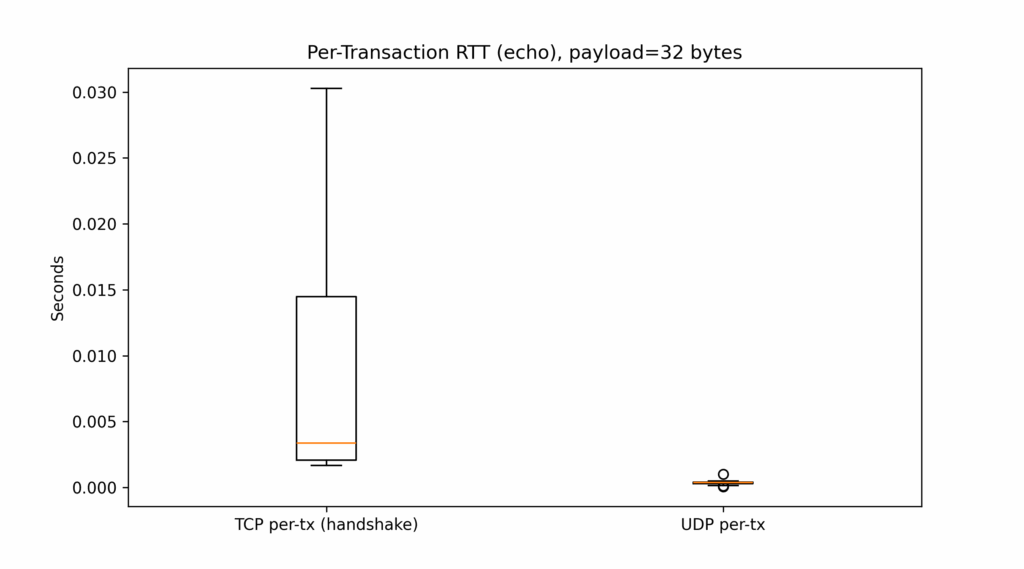
Asynchronous Implementation
For use cases with high concurrency or where blocking I/O operations create bottlenecks, an asynchronous approach offers superior performance. By leveraging non-blocking I/O patterns, asynchronous code can efficiently handle numerous connections simultaneously without the overhead of traditional threading models. The example below implements this efficient approach using Python’s asyncio library and asyncio.DatagramProtocol class, which provide a robust framework for managing asynchronous network operations with clean, maintainable code structures.
This implementation focuses only on UDP, as it’s particularly well-suited for asynchronous processing due to its connectionless nature and efficiency with non-blocking high-speed datagrams. While TCP could also benefit from async implementations, UDP’s inherently stateless design makes it an ideal candidate for demonstrating the performance advantages of event-driven I/O operations, especially in scenarios requiring high throughput with minimal latency overhead.
#--------------------
# async udp messages
# di Michele Danilo Pierri
# 08/08/2025
#--------------------

import asyncio
import time
import matplotlib.pyplot as plt

REPEAT = 1000
HOST = '127.0.0.1'
PORT = 6000
MESSAGE = b"Async UDP message"
async_durations = []

class EchoServerProtocol(asyncio.DatagramProtocol):
    def datagram_received(self, data, addr):
        pass  # No response needed

async def run_async_server():
    loop = asyncio.get_running_loop()
    transport, _ = await loop.create_datagram_endpoint(
        lambda: EchoServerProtocol(), local_addr=(HOST, PORT))
    await asyncio.sleep(2)  # Wait for messages
    transport.close()

async def run_async_client():
    loop = asyncio.get_running_loop()
    transport, _ = await loop.create_datagram_endpoint(
        lambda: asyncio.DatagramProtocol(), remote_addr=(HOST, PORT))
    for _ in range(REPEAT):
        start = time.time()
        transport.sendto(MESSAGE)
        async_durations.append(time.time() - start)
        await asyncio.sleep(0.01)
    transport.close()

async def main_async():
    server = asyncio.create_task(run_async_server())
    await asyncio.sleep(0.5)
    await run_async_client()
    await server

asyncio.run(main_async())

plt.plot(async_durations, label="Async UDP")
plt.title("Async UDP Transmission Times")
plt.xlabel("Message Index")
plt.ylabel("Duration (s)")
plt.grid(True)
plt.legend()
plt.show()
Results & Discussion
- UDP consistently shows shorter durations due to its non-blocking, connectionless nature.
- TCP introduces overhead from connection setup and acknowledgment processes.
- In the async variant, latency is minimal with stable performance.
Limitations of the benchmark:
- Tests run on
localhost, eliminating real network congestion and packet loss - Real-world performance would differ significantly from these controlled conditions
- For comprehensive UDP analysis, use tools like
tcornetemon Linux to simulate jitter and packet loss
Secure Data Transmission in Healthcare IT
Medical data transmission (including electronic health records, lab results, imaging data, and wearable sensor streams) must meet strict requirements for confidentiality, integrity, availability, and traceability.
While TCP and UDP serve as foundational transport protocols, security and compliance in healthcare are implemented at higher layers through specialized protocols, encryption methods, and standardized frameworks designed specifically for medical contexts.
Key concepts
- Transport-level security: Protocols like TLS (Transport Layer Security) establish encrypted communication channels over TCP connections, ensuring confidential and tamper-proof data transmission between endpoints. This security layer is commonly implemented in healthcare systems through protocols such as HTTPS for web-based applications and FTPS for secure file transfers, providing essential protection for sensitive patient information during network transit.
- Application-level security: Healthcare standards such as HL7 v2, FHIR, and DICOM implement comprehensive security frameworks that utilize encrypted communication channels and enforce robust security measures including strict authentication protocols, granular role-based access control systems, and comprehensive audit logging mechanisms that track all data access and modifications for compliance and security purposes. These standards are designed to maintain data integrity while enabling secure information exchange between different healthcare systems and providers across organizational boundaries.
- VPN/IPSec tunnels: These establish secure, encrypted communication pathways between healthcare facilities, including hospitals, outpatient clinics, laboratories, and remote patient monitoring devices. By creating protected virtual corridors across public networks, VPN/IPSec implementations ensure that sensitive medical data remains confidential and protected from unauthorized access during transmission, while maintaining compliance with healthcare privacy regulations and security standards.
- Payload encryption: Medical data is often encrypted directly at the application level (using advanced symmetric encryption algorithms like AES-256 or asymmetric cryptographic methods such as RSA-2048) before transmission across any network. This additional security layer ensures that even if transport-level protections are compromised, the medical information itself remains encrypted and inaccessible to unauthorized parties, providing defense-in-depth for sensitive patient data regardless of the underlying transport protocol being used.
Protocols commonly used in medical systems
- HL7 (Health Level 7): classic messaging for lab results, admissions, etc., often over TCP with MLLP framing, or over HTTPS (FHIR).
- FHIR (Fast Healthcare Interoperability Resources): RESTful API standard using HTTP/HTTPS + JSON/XML + OAuth2 for secure access.
- DICOM (Digital Imaging and Communications in Medicine): for imaging data (CT, MRI, ultrasound), built over TCP and optionally secured via TLS.
Standards, however, are a necessary but not sufficient condition. Two systems can both be FHIR-compliant and still fail to exchange anything clinically meaningful, because interoperability breaks down at the semantic and organisational level long before it breaks down at the protocol level.
Concrete technologies used in hospitals or medical software
| Technology | Use | Security |
|---|---|---|
| VPN IPSec / OpenVPN | Inter-hospital connections or with remote devices | High |
| TLS 1.3 over HTTPS | FHIR or REST communications | High |
| SSH/SFTP | Secure transfer of HL7, CSV, XML files | High |
| DICOM over TLS | PACS/RIS communications | High (if enabled) |
| MQTT with TLS | Healthcare IoT, continuous monitoring devices | High |
| Mirth Connect | Integration engine for HL7/FHIR | Depends on configuration |
Practical example: secure transmission of an ECG
- ECG device captures patient data.
- Data is formatted as XML or DICOM files.
- The device creates a secure HTTPS/TLS connection with the central server.
- The system verifies identity through OAuth2 authentication.
- Encrypted data travels to either a FHIR API endpoint or an HL7 integration engine.
- The server records the transaction and stores the data in an encrypted database.
- Authorized physicians can view the data through a secure internal web portal (with authentication and comprehensive access logging).
Python for Medical Data Transfer
Let’s simulate the transmission of data with healthcare-grade security using HL7/FHIR protocols in Python. For this demonstration, we use the public HAPI FHIR Test Server, a free testing endpoint provided by the HAPI FHIR open-source project and maintained by Smile Digital Health. This server is designed exclusively for development and interoperability testing, with all uploaded resources being periodically purged. Never submit real patient data — use only synthetic or anonymized test data.
#--------------------
# fhir transfer
# di Michele Danilo Pierri
# 08/08/2025
#--------------------

import requests
import json
import uuid
import datetime

# ------------------------
# CONFIGURATION
# ------------------------

# Target FHIR server URL — for example, a test HAPI FHIR server
FHIR_SERVER_URL = "https://hapi.fhir.org/baseR4/Patient"

# Fake bearer token to simulate OAuth2
ACCESS_TOKEN = "Bearer fake-token-for-demo-use-only"

# ------------------------
# FHIR RESOURCE GENERATION
# ------------------------

# Build a sample Patient resource according to the HL7 FHIR R4 standard
# This object will be serialized as JSON and sent to the FHIR server
def generate_fake_patient():
    patient_id = str(uuid.uuid4())  # generate a random patient ID
    today = datetime.date.today().isoformat()

    patient_resource = {
        "resourceType": "Patient",
        "id": patient_id,
        "active": True,
        "name": [
            {
                "use": "official",
                "family": "Doe",
                "given": ["John"]
            }
        ],
        "gender": "male",
        "birthDate": "1985-05-15",
        "deceasedBoolean": False,
        "address": [
            {
                "use": "home",
                "line": ["1234 Main Street"],
                "city": "Springfield",
                "state": "IL",
                "postalCode": "62704",
                "country": "USA"
            }
        ],
        "identifier": [
            {
                "use": "usual",
                "type": {
                    "coding": [
                        {
                            "system": "http://terminology.hl7.org/CodeSystem/v2-0203",
                            "code": "MR"
                        }
                    ]
                },
                "system": "http://hospital.smarthealth.org/mrn",
                "value": f"MRN-{patient_id[:8]}"
            }
        ],
        "meta": {
            "lastUpdated": today
        }
    }

    return patient_resource

# ------------------------
# SENDING FUNCTION
# ------------------------

def send_patient_to_fhir_server(patient_data):
    """
    Sends the given FHIR Patient resource to the configured FHIR server using HTTPS POST.
    Includes authentication headers and content negotiation headers.
    """
    headers = {
        "Authorization": ACCESS_TOKEN,
        "Content-Type": "application/fhir+json",
        "Accept": "application/fhir+json"
    }

    try:
        print("Sending patient data to FHIR server...")
        response = requests.post(FHIR_SERVER_URL, headers=headers, data=json.dumps(patient_data))

        if response.status_code in [200, 201]:
            print("Patient resource successfully sent.")
            print(f"Server response location: {response.headers.get('Location', 'N/A')}")
        else:
            print(f"Failed to send patient resource. Status code: {response.status_code}")
            print(f"Response body: {response.text}")

    except requests.exceptions.RequestException as e:
        print(f"Network error: {e}")

# ------------------------
# MAIN
# ------------------------

if __name__ == "__main__":
    print("Generating fake FHIR Patient resource...")
    patient = generate_fake_patient()
    print("Payload preview:")
    print(json.dumps(patient, indent=2))

    send_patient_to_fhir_server(patient)
Technical notes
- The HAPI server used accepts
POSTtests, but the data is public and visible to everyone. - In a real environment:
- servers must use HTTPS with valid certificates;
- authentication occurs through OAuth2 or JWT;
- data must be encrypted at rest (not only in transit).
Legal and compliance framework
- GDPR (EU): mandates encryption, access control, and data minimization.
- HIPAA (US): requires secure transmission and auditability of health data.
- ISO 27799 / ISO 27001: information security management in healthcare.
Practical Guidelines:
- Use TCP when data integrity, delivery confirmation, and packet ordering are critical. This includes applications such as:
- Clinical databases
- Electronic health records (EHR)
- DICOM imaging transfer between systems
- Use UDP when real-time performance is more important than occasional packet loss, such as:
- Telemedicine video streams
- IoT patient monitoring devices
- PACS viewers that preload images
- Use asynchronous approaches (e.g.
asyncio,aiohttp) when dealing with:- Multiple concurrent data streams (e.g. multi-patient monitoring)
- Non-blocking UI-driven systems (e.g. healthcare dashboards)
- Efficient use of network resources and low-latency systems
- Secure all communication at the transport or application level:
- Prefer HTTPS/TLS channels, even internally
- Authenticate and authorize using OAuth2 or API keys
- Log and audit every transaction involving personal data
- Adopt medical standards such as FHIR and HL7 to ensure interoperability across systems, vendors, and national health infrastructures.
Conclusions
In this article, we examine the differences between TCP and UDP in terms of structure, behavior, and performance. Through practical benchmarking in Python, we demonstrated how these protocols behave under controlled conditions. We also extended our investigation to include asynchronous programming and its benefits in high-concurrency environments.
However, beyond theory and speed comparisons, we delved into the specific needs of healthcare IT, where the transmission of data is not just about speed or reliability, but about security, traceability, and compliance with international regulations.
References & Resources
- RFC 793 – TCP
- RFC 768 – UDP
- Python
socket - Python
asyncio - Matplotlib
- Linux
tcfor traffic control - General Data Protection Regulation (GDPR), EU 2016/679
- Health Insurance Portability and Accountability Act (HIPAA)
- ISO/IEC 27001 – Information Security Management
- ISO 27799:2016 – Health informatics — Information security management in health